Island Coding
Design summary
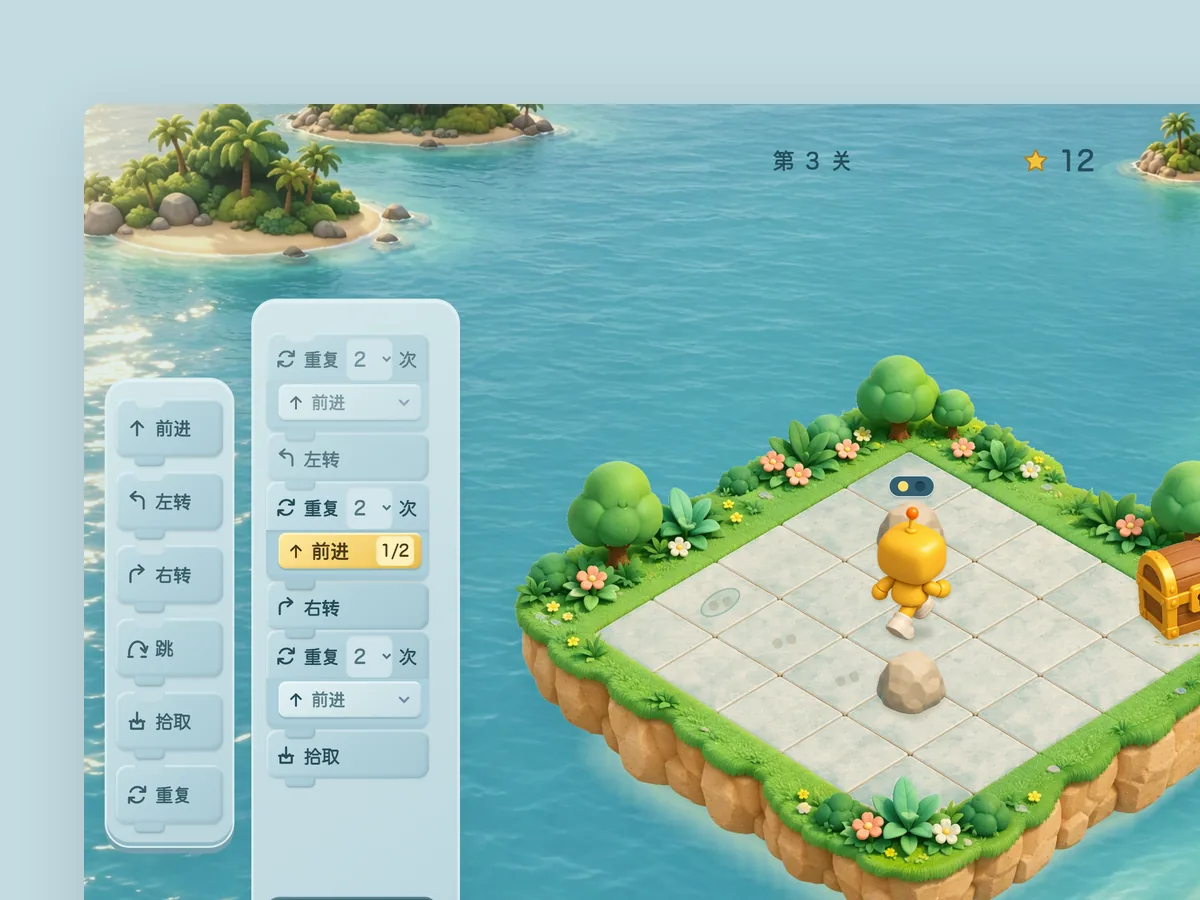
Island Coding lets children aged 6–10 guide a robot across an isometric island with movement, turning, jumping, pickup, and repeat blocks. During execution, the active child block is highlighted with its repeat count; stars fly into progress after the chest opens, while collisions produce feedback within the scene.
Verification
VerifiedThe latest third-round review confirmed the active child block’s hierarchy and nested material treatment, with continuous recordings for success, collision failure, chest opening, and flying stars. It also checked supplied operation records for the main flow, save-failure recovery, and interruptions.
Verification boundaryTurning still relies mainly on whole-body pose swaps rather than the requested planted-foot pivot and continuous weight transfer. The reviewer checked but did not rerun the operation records; physical tablet touch, sound, haptics, and a real reduced-motion run remain unverified.
Prompt
A coding puzzle app for children aged 6–10 (landscape tablet, 1366×1024), with a Chinese interface and as little text as possible: command blocks on the left for moving forward, turning left or right, jumping, picking up objects, and repeating a set number of times; an isometric island level on the right starring a small robot.
After Run is pressed, the robot executes the program one tile at a time while the current block is highlighted. It tumbles when it hits a wall; at the finish, a treasure chest opens and stars fly into the progress indicator. Generate the character, scenery, and props as a coordinated set after writing an asset style guide. Give the robot three or four expressions or poses.
Design three states: the start of a level with an empty block area; an assembled program running; and level-completion results. Also capture a collision failure. Capture at 1366×1024, DPR=2, naming the images `shots/app.png`, `app-2.png`, and so on. No `screens.html` is needed.
View Chinese original
一个给 6–10 岁孩子学编程的闯关 App(平板横屏 1366×1024),界面用中文,字越少越好:左边是指令积木(前进、左转、右转、跳、拾取、重复几次),右边是一座等距视角的小岛关卡,主角是一个小机器人。
按下运行后,机器人一格一格执行,当前那块积木同步高亮;走错撞墙会摔个跟头,走到终点打开宝箱、星星飞进进度。主角、场景、道具用生图做,先写素材风格说明再成套出图,主角要有三四种表情或姿态。
设计三个状态:关卡开始和空积木区、拼好程序正在运行、通关结算;另截一张撞墙失败。截图按 1366×1024、DPR=2,命名 `shots/app.png`、`app-2.png` 这样排下去,不需要 `screens.html`。