
Designing Product Websites & SaaS Landing Pages with AI Agents
Ask an AI agent for a landing page without a design method and you almost always get the same template: a glowing eyebrow pill, a gradient slogan, and three equal-width feature cards. Strong product websites turn the product’s actual differentiator into a working first-screen artifact and compare distinct visual directions before committing to code.
Key takeaways
- Make the first screen answer three questions immediately: what the product is, why it differs from alternatives, and what the visitor can try or click right now.
- One brief can support wildly different moods—inspect the nine Orvo landing pages in the gallery to see how identical pricing and features take on distinct editorial voices.
- When you have no product photography, skip stock photos and build credibility with interactive configurators, sound or type specimens, and process timelines (like Atelier Volders and Fonderie Mercier).
- Design at 1440×900 for desktop pacing, then verify the 390px mobile viewport for headline wraps, pricing table legibility and tap targets.
npx skills add oil-oil/oil-uiBrowse 40+ working websites and prompts in the /en/inspiration/web-design/ collection.
Why Default AI Landing Pages Look Interchangeable
When a prompt says only "build a modern landing page for my AI startup," the model has no domain material to anchor the layout. It falls back on safe defaults: dark purple gradients, floating pill badges, three cards labeled "Fast / Smart / Secure," and invented percentage callouts.
Compare that with the websites in the Oil UI gallery. Fieldwork Type puts a live, editable typeface tester and license calculator right in the hero. Fonderie Mercier lets visitors strike bronze bells of different diameters and watch overtone decay curves before reserving a casting slot. Orvo anchors its page around two concrete facts: guidance from founders who have shipped products, and flat monthly pricing instead of token billing.
| Section | Default AI template habit | Oil UI approach (with gallery examples) |
|---|---|---|
| Hero section | Eyebrow pill + vague slogan + dual buttons + abstract blob | Clear positioning + working product surface or live interactive specimen |
| Capabilities | Three identical rounded cards with generic line icons | Task-driven walkthroughs (e.g., 6-week joinery timeline, acoustic tuning sheet) |
| Pricing & booking | Wall of checkmarks with unclear tier differences | Concrete tiers ($0 / $24.99 / $34.99 with live billing toggle) or batch availability |
| Missing photos | Unrelated stock imagery or mismatched AI illustrations | Strong typography, technical diagrams, finish switchers and tactile color palettes |
Exploring Multiple Directions from a Single Brief
The gallery preserves multiple finished directions built from the exact same brief. Every Orvo landing page shares the same facts: conversational app generation, human expert guidance, over 100 templates, and Starter $0 / Pro $24.99 / Unlimited $34.99 pricing with a 20% annual discount.
Yet Orvo · Launch Garden frames the product as a bright, modular cultivation space; Orvo · Tandem emphasizes side-by-side human partnership; and Orvo · Coastal Workshop and Open Creative Studio explore completely different typographic and spatial rhythms. With Oil UI, your agent generates a side-by-side comparison board first so you can pick the direction that fits your brand before polishing details.
A Landing Page Prompt Template That Produces Real Craft
Spend your prompt budget on how the product works, how pricing is structured and what visitors can interact with on the page:
Use Oil UI to design and implement the official landing page for [product name] (1440×900 desktop viewport, responsive down to 390px wide).
- Product & audience: [1–2 sentences on who uses it and what job it completes]
- Two real differentiators: [e.g., 1) flat monthly subscription instead of credit billing; 2) live interactive preview or expert review]
- Required sections & real figures:
  1. Hero: Clear positioning plus an interactive [tester / calculator / live workflow preview];
  2. Capabilities: Show [3 specific use cases or template categories];
  3. Pricing: [Exact tier names and prices, with a working monthly/annual toggle];
  4. Closing call to action.
- Asset constraints: [State whether product photos exist; if not, rely on typography, layout and custom vector/canvas graphics].
Propose 3 distinct visual directions side by side before building the final page.
Works across SaaS products, developer tools, hardware launches and independent studios.
Working gallery examples & prompts
Open the live demos at 1440px or 390px to inspect how the model and prompt shaped the final interface.
Fieldwork Type
Independent type foundry
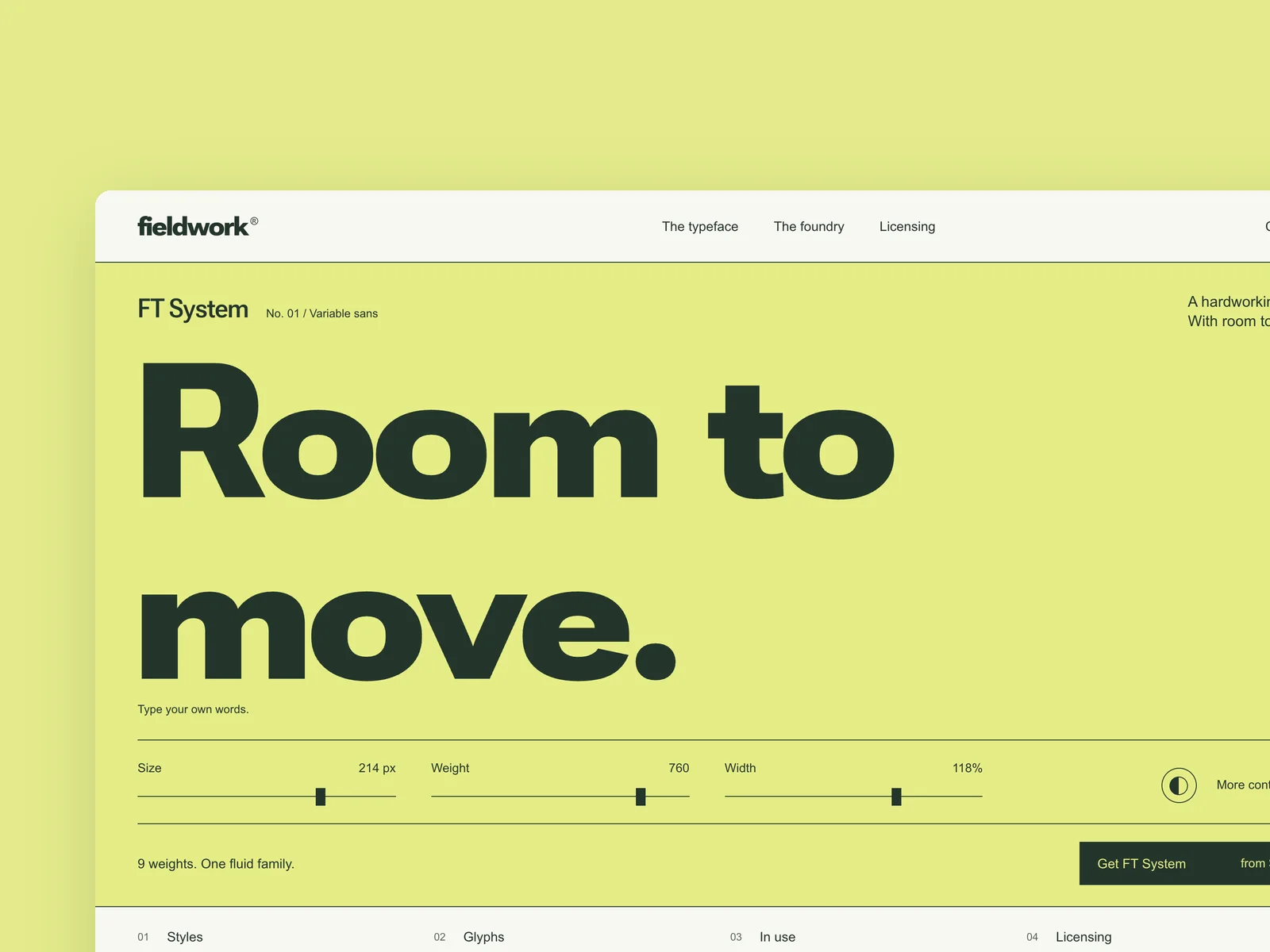
The website of an independent type foundry (from 1440×900, responsive down to 390 wide). The first screen features a flagship typeface: visitors can type their own text and adjust size, weight and width. Further down: the family's weight chart, the character set, in-use examples, and licenses chosen by use (desktop, web, app) that can be added to the cart. The type tester and the license picker are the heart of this piece: the setting changes as you type, and the license price updates with every option. Design the first screen, the tester panel expanded, and license selection.
Inspect work & prompt →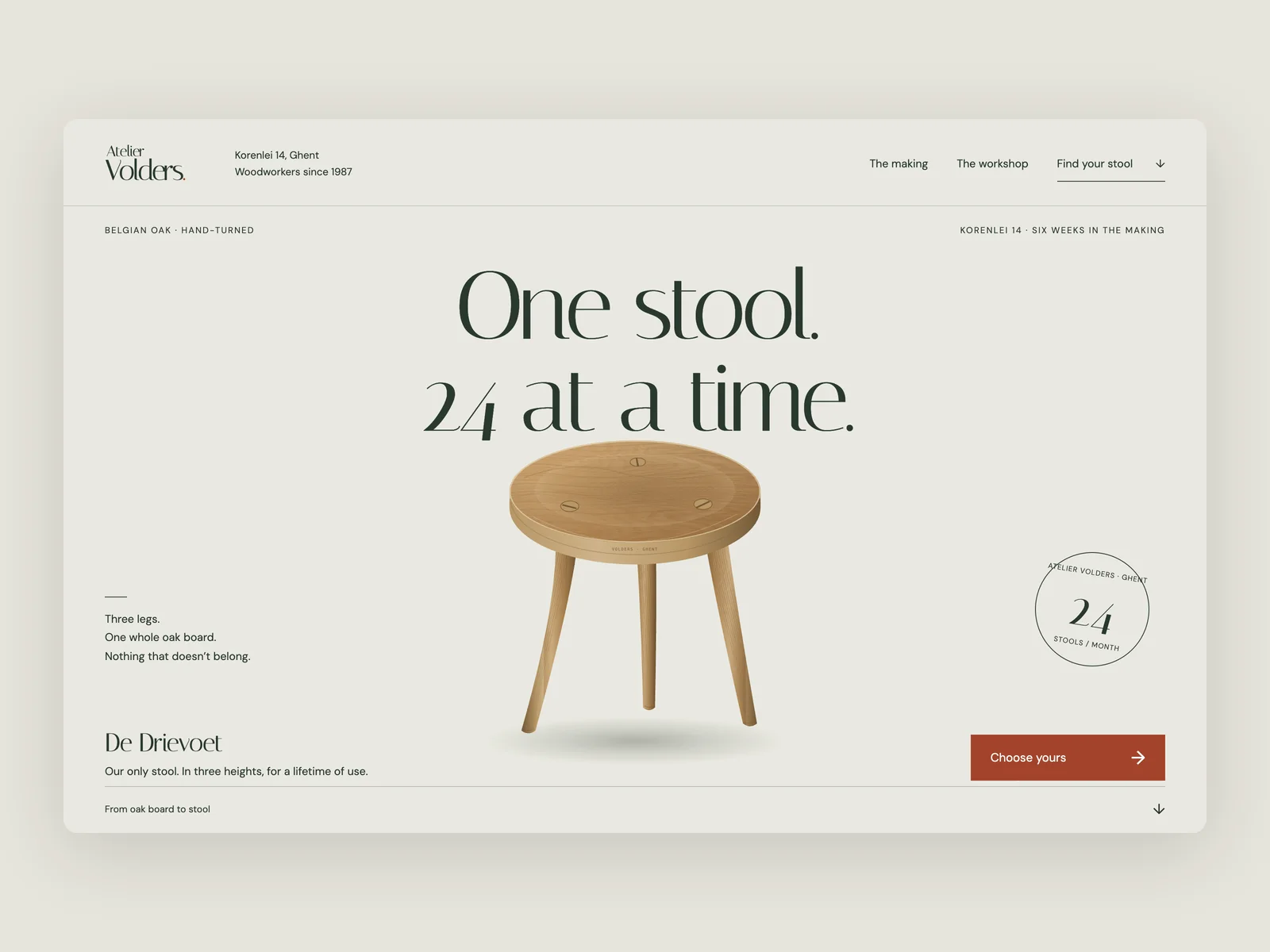
Atelier Volders · Grain & Tenon
Handcrafted furniture workshop website
The website of Atelier Volders, a two-person woodworking workshop at Korenlei 14 in Ghent, Belgium (from 1440×900, responsive down to 390 wide), with an English interface. They make only one object: De Drievoet, a three-legged solid oak stool turned and wedged by hand from timber air-dried for three years, produced in a single monthly batch of 24 stools. It comes in three heights (32 cm low hearth stool €240, 45 cm dining & desk stool €270, 62 cm counter stool with ash foot-ring €310) and three finishes (soap-scrubbed raw oak, fumed dark oak, boiled linseed oil & beeswax). Visitors can switch height and finish in real time, explore the six-week making process, underside hot-iron batch stamp and Saturday open hours, and reserve a stool from the current batch. No product photos are provided.
Inspect work & prompt →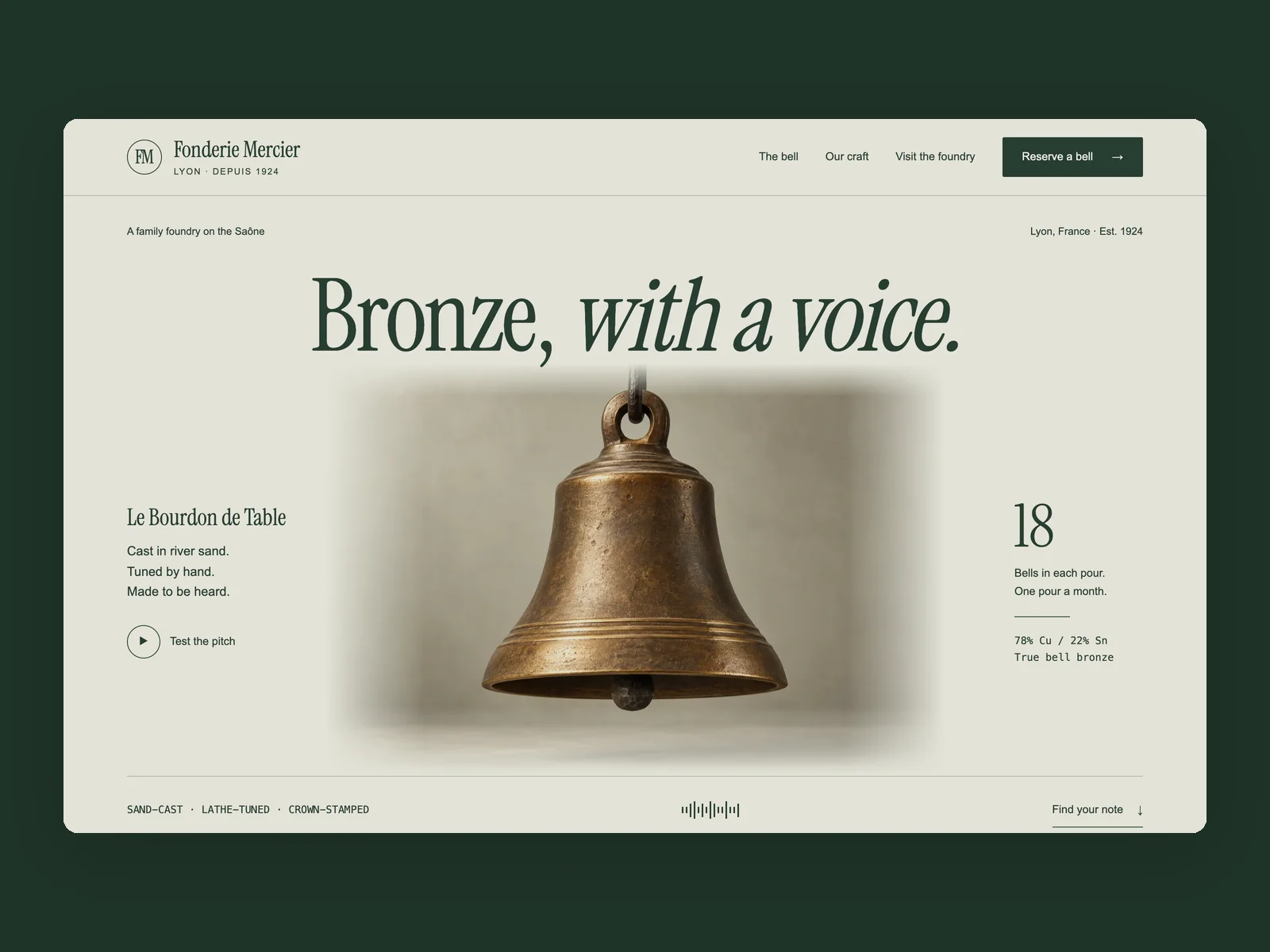
Fonderie Mercier · Bronze, with a Voice
Family bronze bell foundry website
The website of Fonderie Mercier, a third-generation family bell foundry at Quai Saint-Vincent 28 on the Saône river quay in Lyon (from 1440×900, responsive down to 390 wide), with an English interface. They cast a single signature object in 78% copper / 22% tin bell bronze using rammed river-sand moulds: Le Bourdon de Table, lathe-tuned to a precise musical pitch and poured once a month in a fixed lot of 18 bells. It comes in three sizes and pitches (Ø 72 mm desk bell A4 440Hz €180, Ø 96 mm courtyard bell F#4 370Hz €240, Ø 124 mm wall bell with forged iron bracket D4 293.7Hz €340) and three patinas (raw lathe-turned bronze, smoked bronze, verdigris). Visitors can listen to each pitch, switch size and patina, explore the five-stage pouring process, cold-stamped crown record and Friday open hours, and prepare a reservation slip for the next monthly pour. No product photos are provided.
Inspect work & prompt →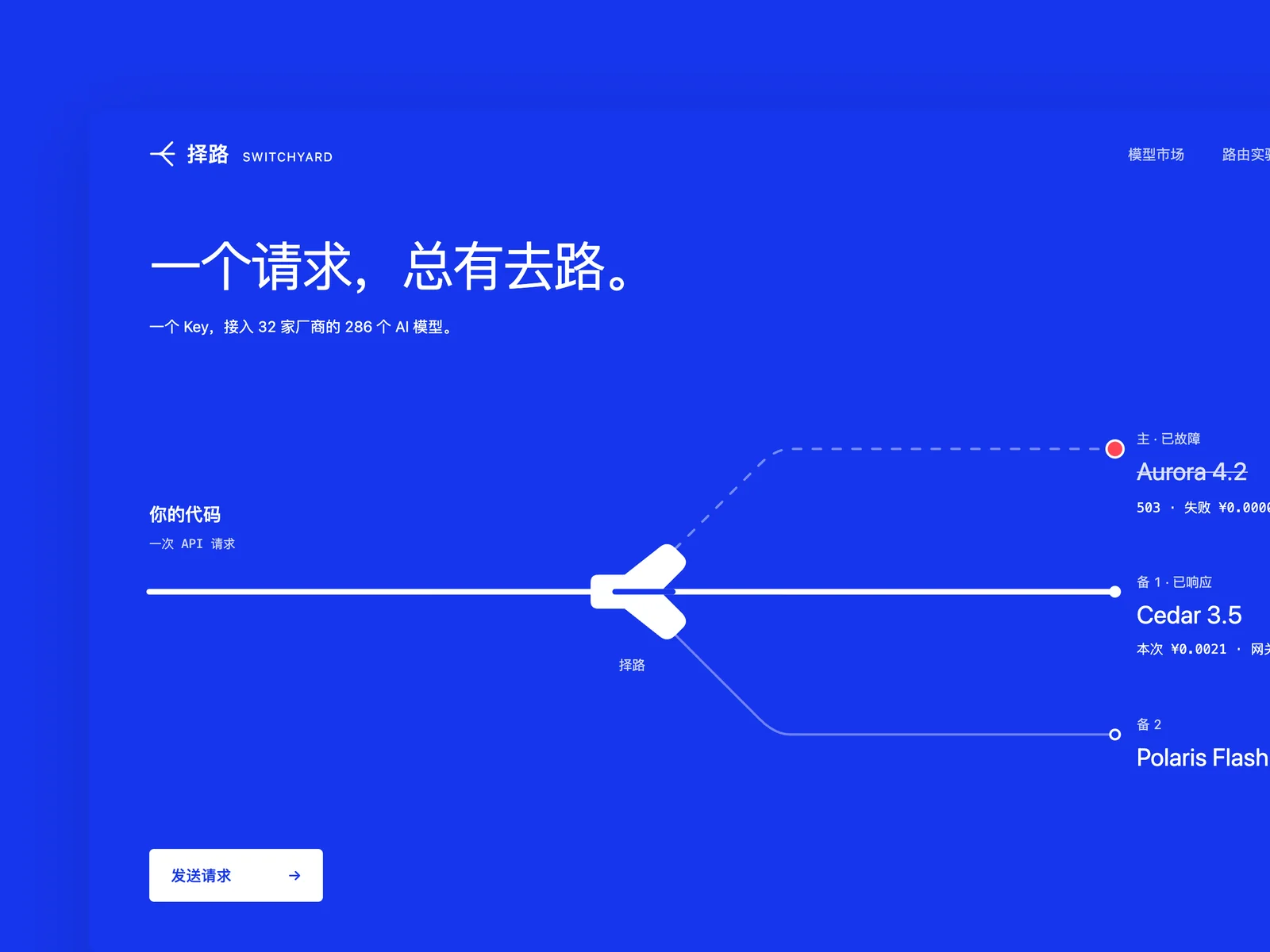
Routewise
AI API platform website
The website for an AI model API aggregation platform similar to OpenRouter (starting at 1440×900, responsive down to 390 pixels wide), with a Chinese interface, for developers in China: one API key gives access to hundreds of models from dozens of providers, with unified billing, automatic failover, and routing by price or latency. Provider and model names should be fictional but believable. Creativity is the first priority. Do not make another AI website with a dark gradient and a code block. The core is making routing visible: a request leaves your code and is routed to a provider; if that provider fails, it switches to a backup automatically, with price and latency immediately visible. The model marketplace supports filtering and comparison by provider, context length, and price. Design three states: the first screen; filtering and comparing in the model marketplace; and the routing and failover process for a request.
Inspect work & prompt →Step up to Oil UI Pro for expressive surfaces and deep zoom QA
Upgrade to Oil UI Pro when your website needs custom SVG light trails, dot matrices or flowing gradients, 19 specialized card and spatial expansion prototypes, and multi-round blind reviews at 100% and 200% zoom.
npx github:oil-oil/oil-cli install oil-ui-proCommon questions
How do I make a landing page look convincing when I have no product photos?
Turn a real piece of domain logic into an interactive specimen on the page. In Atelier Volders, visitors switch between 32 cm, 45 cm and 62 cm oak stools and three wood finishes; in Fonderie Mercier, visitors audition bell frequencies. Neither uses stock photography.
Should my landing page be dark mode or light mode?
Match the medium and subject matter. Low-level runtimes (Archon) or astronomical horology (Chronos) suit dark surfaces, while most SaaS products, type foundries and craft stores read more comfortably on warm paper or daylight backgrounds.
How should I verify the mobile version of a landing page?
Open the page at 390×844 in a real browser. Check that display headlines do not wrap into awkward single-word orphans, interactive hero controls remain usable by touch, and pricing tiers stack cleanly without horizontal scroll clipping.
Can I switch between desktop and phone viewports inside the Oil UI gallery?
Yes. Every web piece in the gallery includes a viewport toggle in the bottom bar so you can inspect both the 1440px desktop layout and the 390px mobile layout live.