
How to Fix Generic "AI Slop" UI: A Subtraction Checklist for Coding Agents
Left unguided, language models converge on the same recognizable UI habits: a glowing eyebrow pill above every heading, cards nested inside cards, 4px colored left borders, and invented "+128% efficiency" badges tucked into the corner. Removing that generic AI look does not come from adding more shaders—it comes from subtracting those default habits and anchoring the layout in real domain material.
Key takeaways
- Spot the telltale AI defaults early: ubiquitous eyebrow pills, 4px left accent bars, triple-nested cards, wide-tracked uppercase labels and invented KPI percentages.
- Replace boxes with alignment and spacing: if two items already read as a group through proximity and type scale, delete the outer wrapper.
- Ground every number in real product logic (actual tier prices, batch sizes or millisecond latencies) rather than filler marketing statistics.
- Run Oil UI’s subtraction and readability checklists against 100% and 200% browser screenshots before shipping.
npx skills add oil-oil/oil-uiEquips your coding agent with built-in anti-slop rules and visual review checks.
Six Habits That Instantly Give Away an Unedited AI Interface
What people call "AI slop" is rarely a single bad color—it is a cluster of filler widgets the model inserts when it does not know what should carry visual weight. Eliminating these six patterns changes the feel of a page immediately:
| Default AI habit | Why it hurts the interface | Oil UI replacement & subtraction |
|---|---|---|
| An eyebrow pill badge above every section heading | Twelve pills down a page flatten hierarchy so nothing feels important | Enter sections directly with a clear heading or numeral; save badges for real live statuses |
| Cards nested inside cards with 4px colored left borders | Stacked padding and parallel borders crowd out the actual content | Drop outer card wrappers; group content with grid alignment, whitespace and single hairline rules |
| Purple/indigo neon gradients and frosted glass everywhere | Applies the same crypto/SaaS palette to woodshops, clinics and developer tools alike | Derive surface and accent colors from the domain (raw oak & linen, dark bronze, paper & ink) |
| Invented "+240% velocity" or "99.98% accuracy" filler badges | Visitors spot fake numbers immediately, eroding trust in the real product | Display only genuine product figures (stool dimensions in cm, batch size of 24, real invoice rows) |
| Three identical equal-width cards with circle line icons | The "Fast / Smart / Secure" three-card row is the signature cliché of one-shot prompts | Use asymmetric layouts or put a working interactive control directly on the canvas |
| Low-contrast gray-on-gray body copy and tiny uppercase labels | Looks tidy as a thumbnail but strains the eyes during actual reading | Enforce legible contrast, a comfortable 55–75 character measure and four clear type sizes |
How to Subtract Noise: Borders First, Then Type Scale and Air
Open Fieldwork Type, Atelier Volders · Grain & Tenon or TRACE (scent) in the gallery. You will notice how rarely they wrap content in shadowed rounded boxes, yet every section feels distinct. That clarity comes from three fundamentals:
- Use fewer font sizes with bolder contrast between them
- Four distinct sizes (display heading, section heading, body copy and caption/meta) can carry an entire application. Avoid scattering 11px, 12px, 13px, 14px and 15px across the same view.
- Delete half the borders and test whether the layout still holds
- During review, strip container borders and background fills one by one. If left-alignment and vertical rhythm already separate the groups, leave the box off.
- Let working controls replace decorative icons
- Instead of drawing a shield icon next to a paragraph about flexible licensing, render the actual Desktop / Web / App license checkboxes and let the price update on click.
An Anti-Slop Prompt Block You Can Add to Any Brief
Alongside installing Oil UI, you can include these explicit guardrails when prompting your coding agent:
Apply Oil UI standards and enforce these subtraction rules:
1. Do not place eyebrow pill badges above section headings, do not use 4px colored left accent borders, and avoid default purple/blue glowing gradients.
2. Do not invent filler marketing metrics (such as "+128%" or "99.9% uptime") or generic three-column "Fast / Smart / Secure" icon cards.
3. Avoid nesting cards inside cards; build hierarchy with grid alignment, typographic contrast, generous whitespace and subtle 1px dividers.
4. Capture 1440×900 and 390×844 screenshots and remove any border or wrapper whose deletion does not reduce clarity.
Works best when Oil UI is installed via npx skills add oil-oil/oil-ui.
Working gallery examples & prompts
Open the live demos at 1440px or 390px to inspect how the model and prompt shaped the final interface.
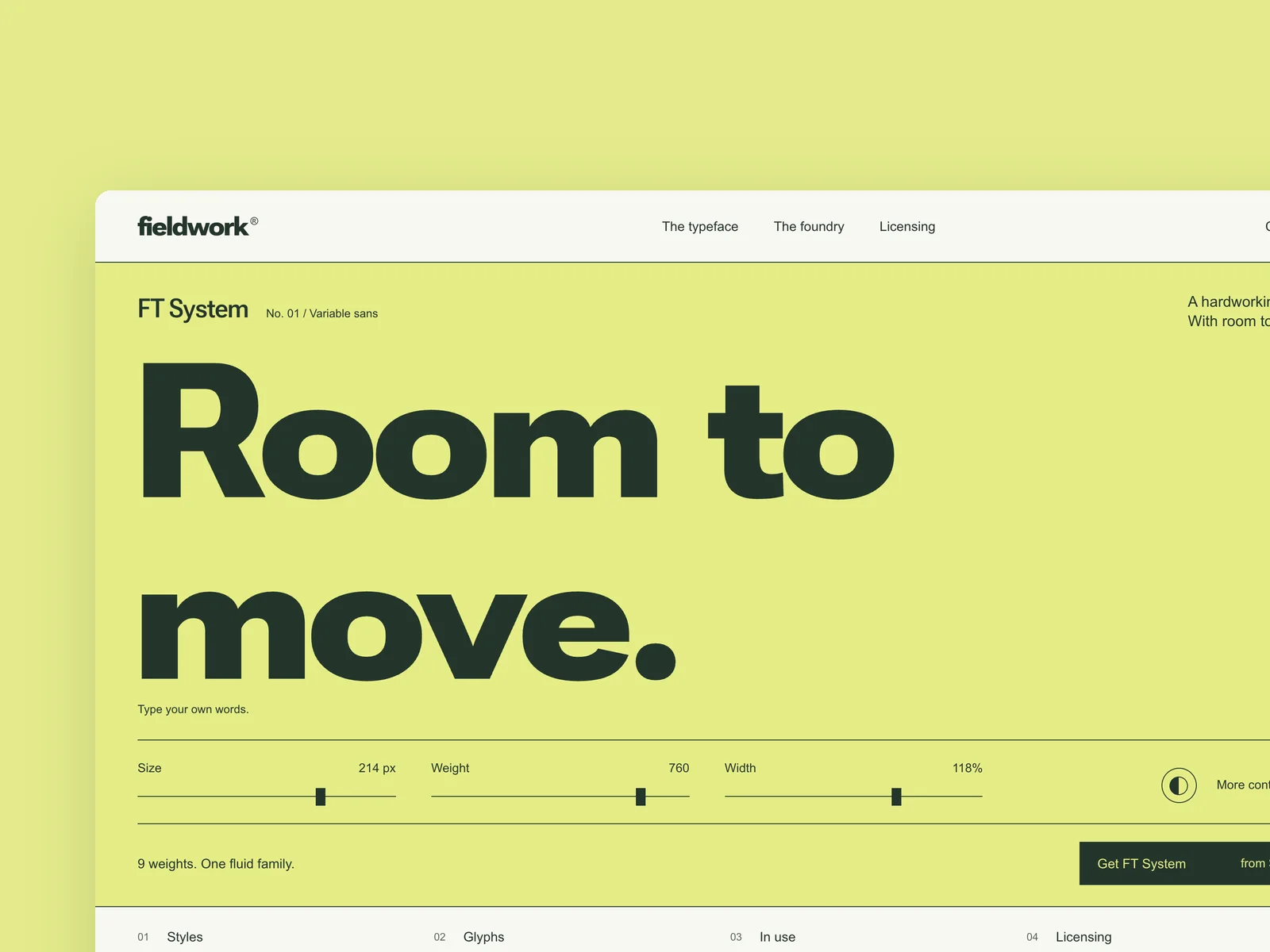
Fieldwork Type
Independent type foundry
The website of an independent type foundry (from 1440×900, responsive down to 390 wide). The first screen features a flagship typeface: visitors can type their own text and adjust size, weight and width. Further down: the family's weight chart, the character set, in-use examples, and licenses chosen by use (desktop, web, app) that can be added to the cart. The type tester and the license picker are the heart of this piece: the setting changes as you type, and the license price updates with every option. Design the first screen, the tester panel expanded, and license selection.
Inspect work & prompt →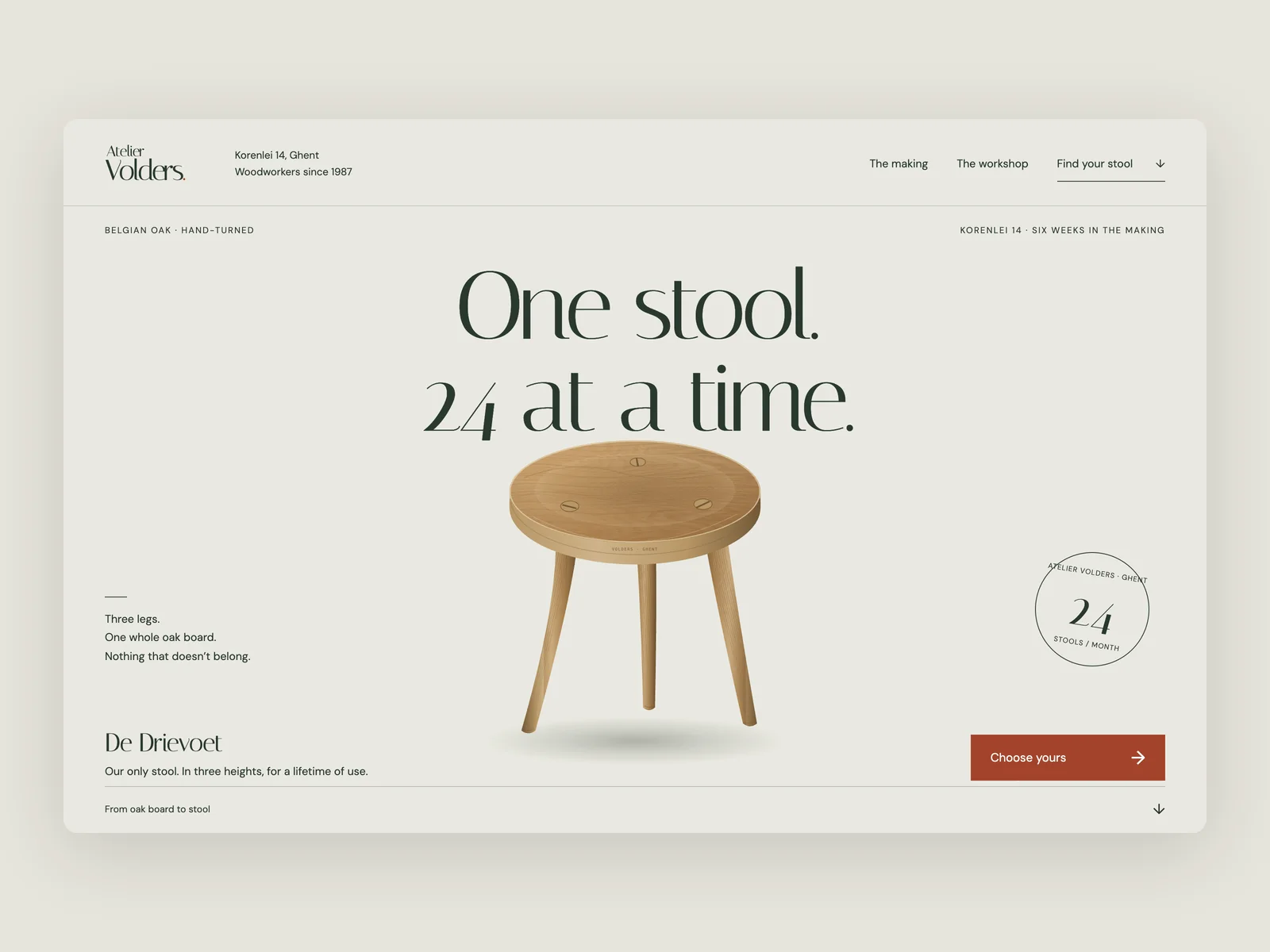
Atelier Volders · Grain & Tenon
Handcrafted furniture workshop website
The website of Atelier Volders, a two-person woodworking workshop at Korenlei 14 in Ghent, Belgium (from 1440×900, responsive down to 390 wide), with an English interface. They make only one object: De Drievoet, a three-legged solid oak stool turned and wedged by hand from timber air-dried for three years, produced in a single monthly batch of 24 stools. It comes in three heights (32 cm low hearth stool €240, 45 cm dining & desk stool €270, 62 cm counter stool with ash foot-ring €310) and three finishes (soap-scrubbed raw oak, fumed dark oak, boiled linseed oil & beeswax). Visitors can switch height and finish in real time, explore the six-week making process, underside hot-iron batch stamp and Saturday open hours, and reserve a stool from the current batch. No product photos are provided.
Inspect work & prompt →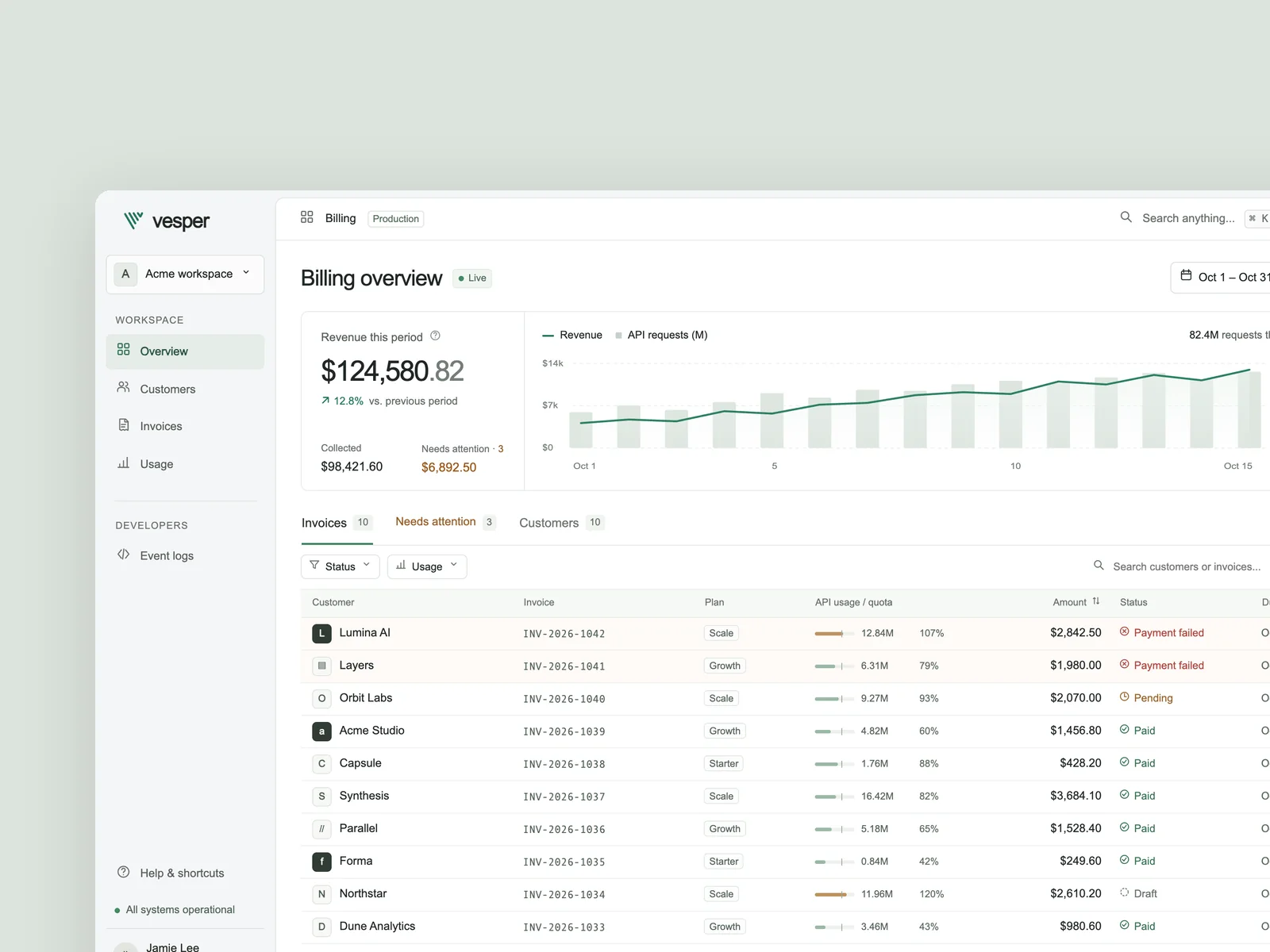
Vesper
API usage billing console
Design an API usage billing and customer invoice console for AI and developer tool teams, with an English interface at a desktop viewport of 1440×900. Users can manage subscription plans and live API usage, review amounts due and invoice exceptions for the current cycle, filter customers or invoices by status and usage threshold, and open a record to inspect line items, payment and Webhook timelines, and event payloads. Include payment retries, quota adjustments, and invoice exports. Implement three key states: the everyday workspace with revenue and usage trends, customer or invoice lists, and live filtering; an exception invoice detail view with a usage breakdown, status timeline, and recovery actions; and a quick command palette. Deliver an offline-ready `index.html` and capture `shots/desktop.png`, `shots/state-1.png`, and `shots/state-2.png` at 1440×900, DPR=2.
Inspect work & prompt →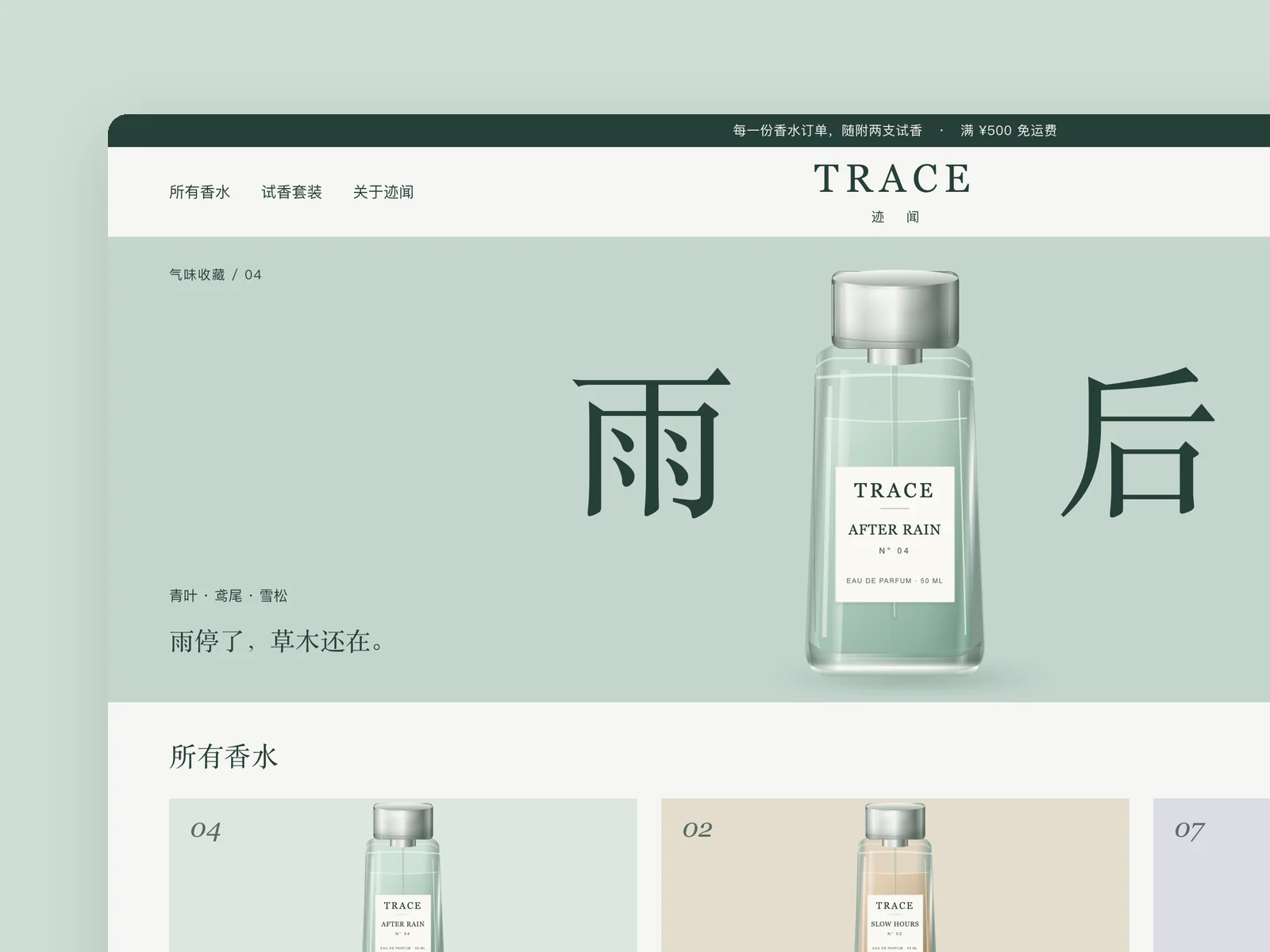
TRACE
Perfume brand store
An online store for a niche perfume brand. Build the store homepage and the detail page for one perfume.
Inspect work & prompt →Oil UI Pro: Complete anti-slop checklists & 200% zoom subtraction
Oil UI Pro includes the full AI default-habit elimination checklist, 100%/200% zoom readability checks, and line-by-line subtraction passes enforced by a context-free subagent reviewer.
npx github:oil-oil/oil-cli install oil-ui-proCommon questions
Why does telling an AI "don’t make it look like AI" rarely work on its own?
Because the model does not map the phrase "looks like AI" to specific DOM and CSS choices. Naming the exact culprits—eyebrow pills, nested card padding, invented KPI badges, equal-width icon trios—and supplying concrete structural alternatives is what changes the output.
If I stop wrapping everything in cards, how do I separate sections?
Use four cleaner tools: 1) clear vertical spacing hierarchy (e.g., 96px between sections vs. 20px within a group); 2) subtle full-bleed surface tone shifts; 3) a single 1px top border paired with a left-hand section label; or 4) asymmetric two-column splits.
When is a pill badge actually appropriate?
When it communicates a live, variable state that users need to spot—such as "Payment failed" in a billing table or "3 stools left in April batch." If a pill merely repeats the section topic above an H2, delete it.
What is the fastest way to spot leftover AI template habits on a page?
Zoom out to 50% or blur the text. If the page looks like a uniform stack of rounded rectangles and symmetric three-column blocks, template habits are still running the layout.