
Multi-Screen Mobile App UI Design at 390×844: Prompts, Flows & Reviews
When you ask an AI agent for a mobile app without viewport and flow rules, you usually get a desktop webpage squeezed into a narrow column: tiny labels, top-heavy navigation and four nested cards fighting for space. Real mobile UI starts from a 390×844 viewport, dedicates each screen to a single primary task, and reviews three to five connected screens side by side.
Key takeaways
- Anchor designs at 390×844 (or device-specific viewports like 198×242 for watches) and place primary actions within natural thumb reach.
- Deliver both an interactive index.html and a side-by-side screens.html so you can judge flow continuity from list to detail to completion at a glance.
- Focus each piece on a tactile state change—like scrubbing a tide curve, confirming a ride pickup pin or twisting open a capsule toy.
- Strip away nested card wrappers that waste horizontal padding on a 390px screen.
npx skills add oil-oil/oil-uiExplore 30+ multi-screen mobile app demos and prompts in /en/inspiration/mobile-app-design/.
Why a Mobile App Is Not a Narrow Webpage
On a 1440px desktop monitor, a user can scan a sidebar, a header bar and a multi-column grid at the same time. On a 390×844 phone screen, attention belongs to the step right under the user’s thumb. Stacking a search bar, a promo banner, four category pills and a two-column card grid onto one phone screen makes every control feel cramped.
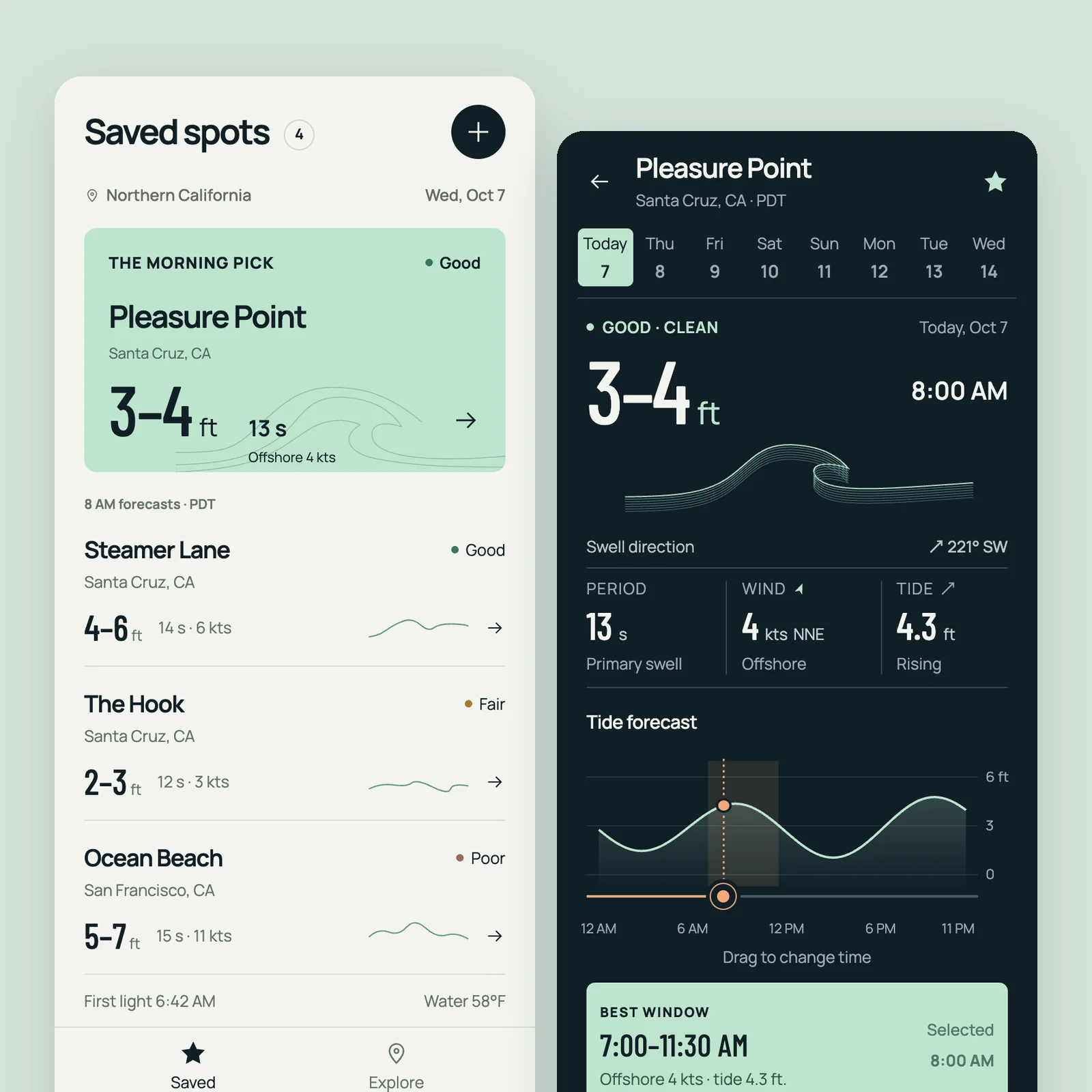
Inspect how the mobile pieces in the Oil UI gallery focus each screen: Tide centers on dragging a timeline to watch swell height, wind and the tide curve move in sync; Pickup (ride) pairs a live map with a bottom sheet across pin confirmation, driver approach and mid-ride destination edits; Pact (bank) and Luma (sleep) give typography and breathing room priority over decorative widgets.
| Work & model | Viewport | Screen 1 (Entry) | Screen 2 (Core interaction) | Screen 3 (Resolution / state) |
|---|---|---|---|---|
| Tide surf forecast (GPT 6.1 Sol) | 390×844 phone | Saved surf spots with best-window callout | 7-day swell, wind and tide curve for one spot | Scrubbing the timeline to inspect a specific hour |
| Pickup ride-hailing (Claude Sonnet 5.5) | 390×844 phone | Pin confirmation and fare estimate sheet | Live driver arrival with vehicle & plate check | In-ride destination change and fare recalculation |
| Luma meditation & sleep (GPT 6.1 Sol) | 390×844 phone | Calm evening home organized by sleep goal | Active breathing guide and audio playback | Morning sleep rhythm and duration summary |
| Splitwater swim watch (GPT 6.1 Sol) | 198×242 watch | Active swim (pure black, one giant length count) | Wall rest countdown ring with haptic cue | Crown-rotation water lock and post-swim summary (5 screens) |
Reviewing Complete Flows with Side-by-Side screens.html
Judging a mobile app from a single home screen hides broken transitions and inconsistent header heights. In the Oil UI workflow, agents generate two views for mobile work:
An interactive index.html at 390×844
Lets you tap navigation tabs, open bottom sheets, drag sliders and test state transitions directly in the browser.
A side-by-side screens.html showing 3 to 5 key screens
Places the entry screen, active interaction state and completion state next to one another on one canvas so you can verify typographic scale, safe-area padding and color continuity across the entire journey.
High-DPI screenshot verification per screen
Captures each 390×844 screen at DPR=2 to check tap target sizes (minimum 44px), bottom home-indicator clearance and label wrapping.
Mobile App Multi-Screen Prompt Template
Use this prompt structure in Claude Code, Codex or Cursor to generate a coherent multi-screen mobile interface:
Use Oil UI to design and implement a [app category, e.g., group trip itinerary planner / personal budgeting app] at a 390×844 mobile viewport.
- Core task & feel: [Describe the signature interaction, e.g., dragging stops to reorder a day’s schedule with live transit-time updates / logging an expense in two taps and watching the weekly allowance bar adjust].
- Three required screens:
  1. Screen 1: [Primary view, e.g., day-by-day trip overview];
  2. Screen 2: [Active interaction state, e.g., dragging a stop or opening the split-expense sheet];
  3. Screen 3: [Completed state or secondary detail view].
- Deliverables: Build both an interactive index.html and a side-by-side screens.html displaying all three screens. Design for thumb reach and full-bleed mobile hierarchy rather than nested desktop cards.
Even if your production app uses React Native, Flutter or SwiftUI, prototyping the 3-screen board in HTML first locks in spacing and hierarchy in minutes.
Working gallery examples & prompts
Open the live demos at 1440px or 390px to inspect how the model and prompt shaped the final interface.
Tide
Surf and tide forecast app
A surf and tide forecast app for surfers (390×844): a list of saved surf spots, and for each spot today's and the next seven days' wave height, period, wind direction and speed, a tide curve, and a suggestion for the best time to go. Tides and conditions change over time, which makes this a data-visualization piece: drag the timeline and the waves, wind and tide update together. Design the spot list, a single spot's detail, and dragging the timeline to a specific moment. Deliver `index.html` and a three-screen side-by-side `screens.html`.
Inspect work & prompt →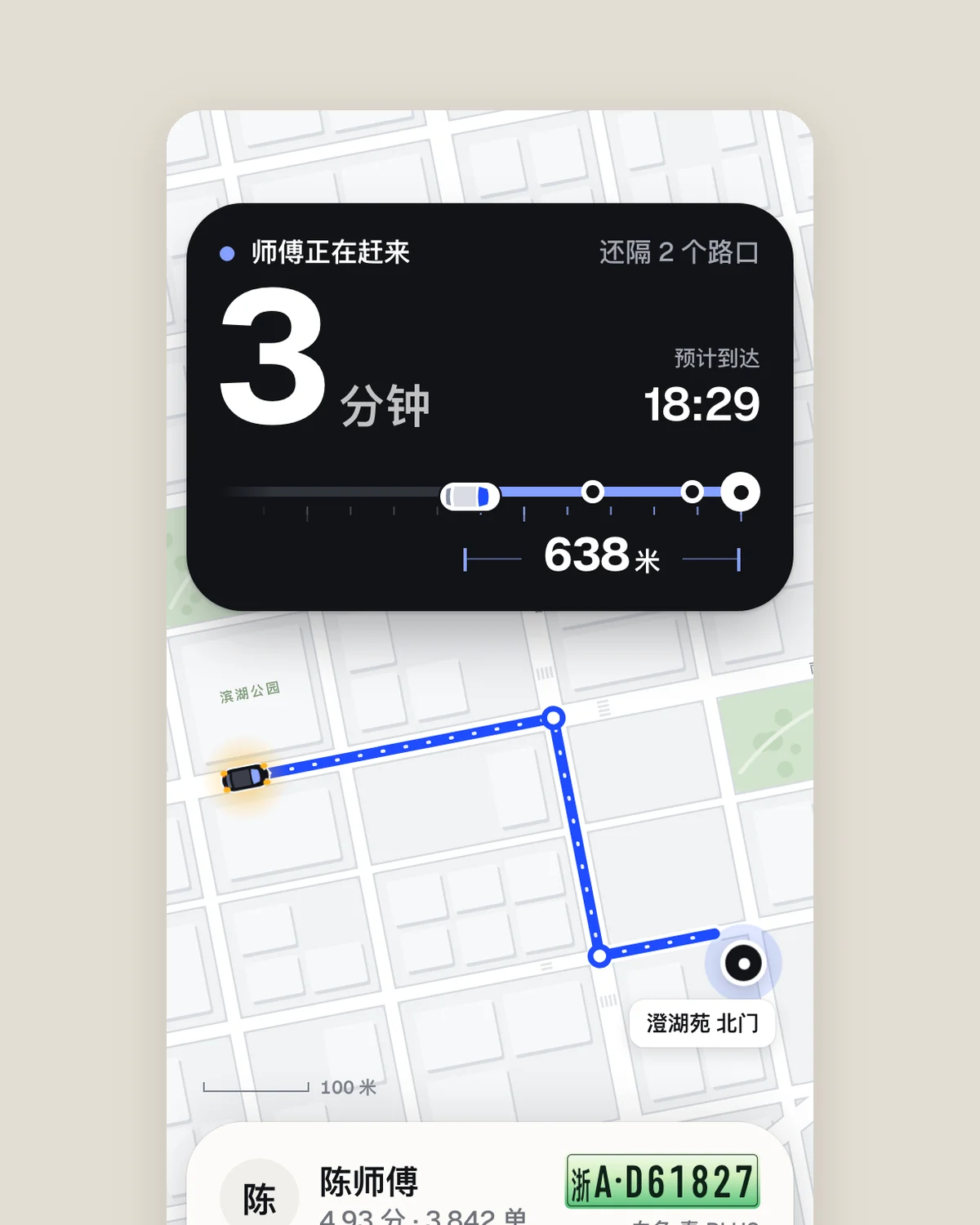
Pickup
Ride-hailing app
The screen after booking a ride in a ride-hailing app (390×844): an approaching car on a map, driver and vehicle details, estimated arrival, and trip progress after pickup. Draw the road network and route in code instead of using real map screenshots. Waiting for the car is the most anxious moment, so make its distance immediately apparent. Capture three states: waiting, car arrived, and trip in progress. Deliver `index.html` and `screens.html` with the three screens side by side.
Inspect work & prompt →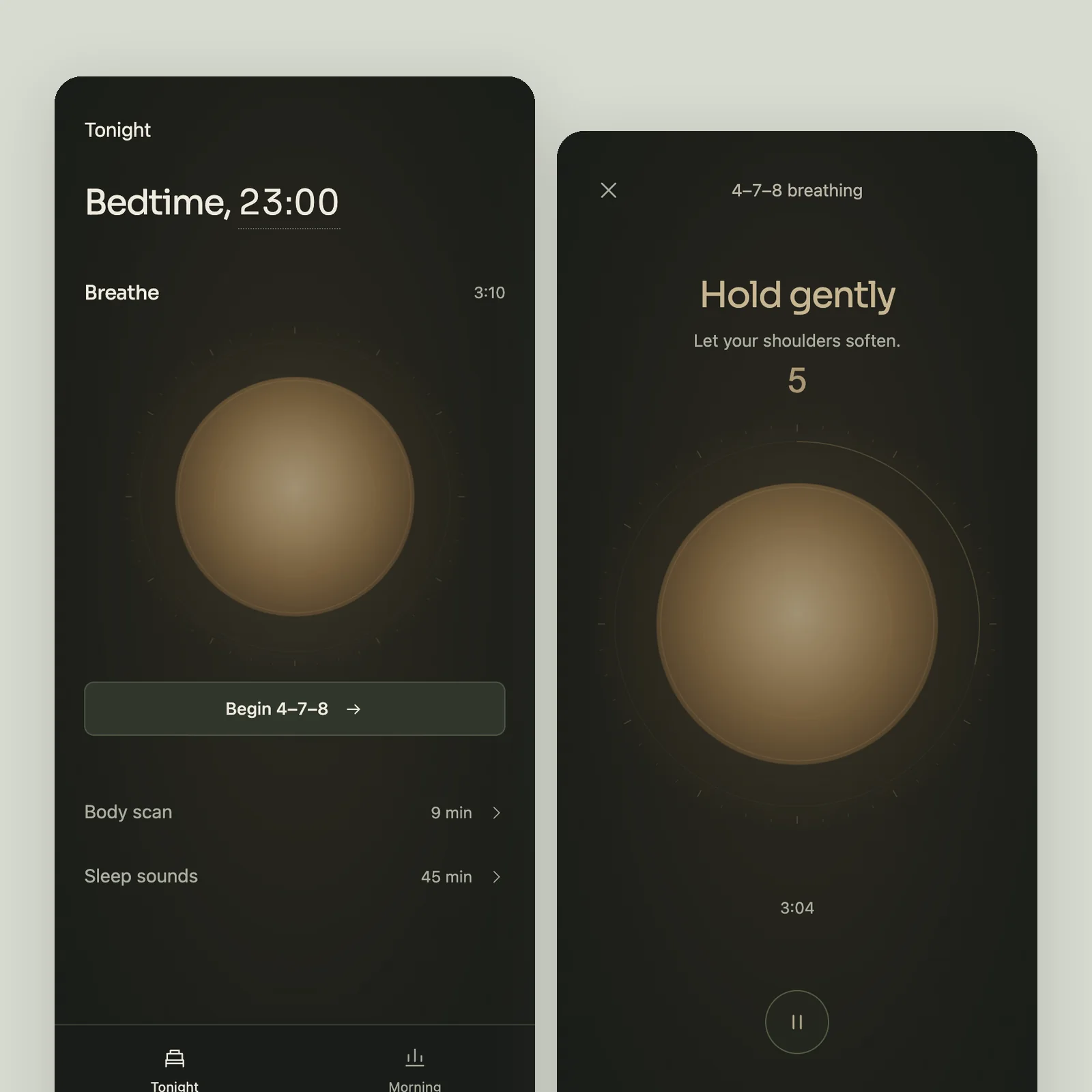
Luma
Meditation and sleep
An app that helps adults who struggle with sleep relax and fall asleep (390×844), with an English interface: a bedtime wind-down routine, guided breathing and meditation, a mix of sleep sounds, and a morning report on last night's sleep. Breathing guidance is the core: the image expands and contracts with the breathing rhythm, such as inhaling for 4 seconds, holding for 7, and exhaling for 8. It should be comfortable to look at at night. The morning report should convey how the night went at a glance without piling up metrics. Avoid the cliché of a purple starry gradient with a moon illustration. Design three screens: Tonight with a wind-down routine, recommended exercises, and sound mixing; a breathing exercise in progress; and a morning sleep report showing time to fall asleep, awakenings, sleep stages across the night, and comparison with this week. Deliver `index.html` and `screens.html` with the three screens side by side.
Inspect work & prompt →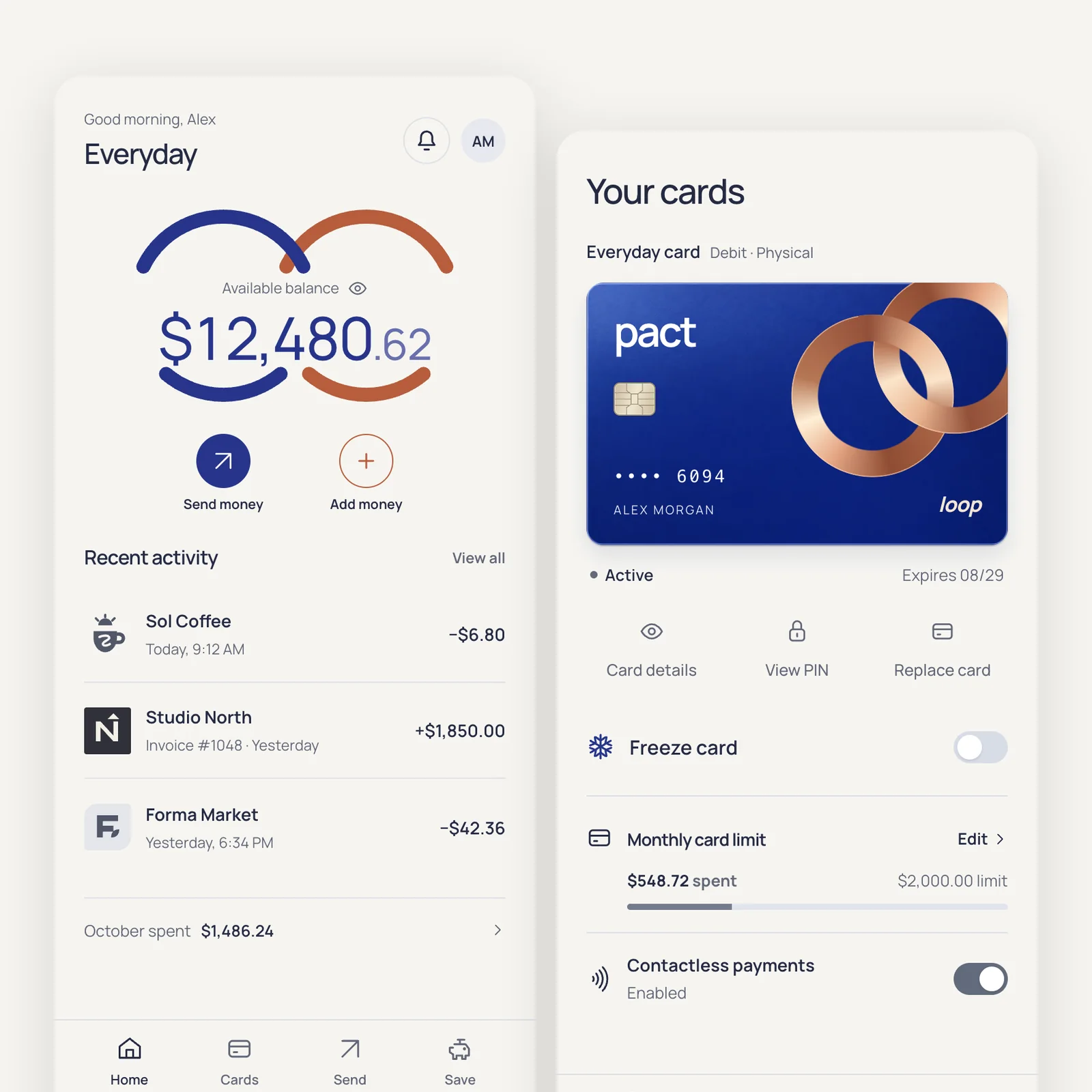
Pact
Digital banking
A digital banking app for freelancers and young professionals (390×844), with an English interface: balance, recent transactions, this month's spending, savings goals, card management, and transfers. The bank name, card designs, and merchant logos are all fictional. Transfers and card controls are the core: choosing a recipient, entering an amount on a numeric keypad, and confirming the transfer should feel reassuring and efficient. Freezing a card with one tap should produce a clear state change. Design three screens: Home with balance, recent transactions, and monthly spending; Cards with the card face, freeze control, limits, and contactless payments; and the transfer flow from entering an amount to successful sending. Deliver `index.html` and `screens.html` with the three screens side by side.
Inspect work & prompt →Polish mobile sheets, error recovery & tactile mini-games with Oil UI Pro
Oil UI Pro covers mobile navigation patterns, bottom sheets, inline form recovery, and specialized layout/state checklists for tactile apps and mini-games like Klak (capsule toys), Ding! Mint Arcade (coin pusher) and Gotcha! (claw machine).
npx github:oil-oil/oil-cli install oil-ui-proCommon questions
Why do mobile app examples in the gallery display three or five screens side by side?
A single static home screen rarely tells you whether an app actually works. Rendering all key screens side by side via screens.html lets you inspect how a user moves from start to finish, while the live demo lets you interact with each screen.
Can I use Oil UI for React Native, Flutter or SwiftUI projects?
Yes. Many teams have the agent build a quick 3-screen HTML direction board at 390×844 to settle layout, typography and color in the browser, then translate the approved direction into SwiftUI, Flutter or React Native components.
How does Oil UI handle non-phone screens like smartwatches, TVs or car displays?
By putting physical viewing distance and input hardware first. In Yeying (TV app at 1920×1080), remote focus states are unmistakable from three meters away; in Yantu (in-car screen at 1920×720), turn guidance expands dynamically while driving; in Splitwater (198×242 watch), wet-screen crown unlocking is built into the state model.
What is the most common AI layout mistake on mobile?
Nesting padded cards inside padded containers on a 390px screen, which leaves barely 260px for actual content. Replacing outer card boxes with full-width sections and subtle dividers immediately opens up the screen.